
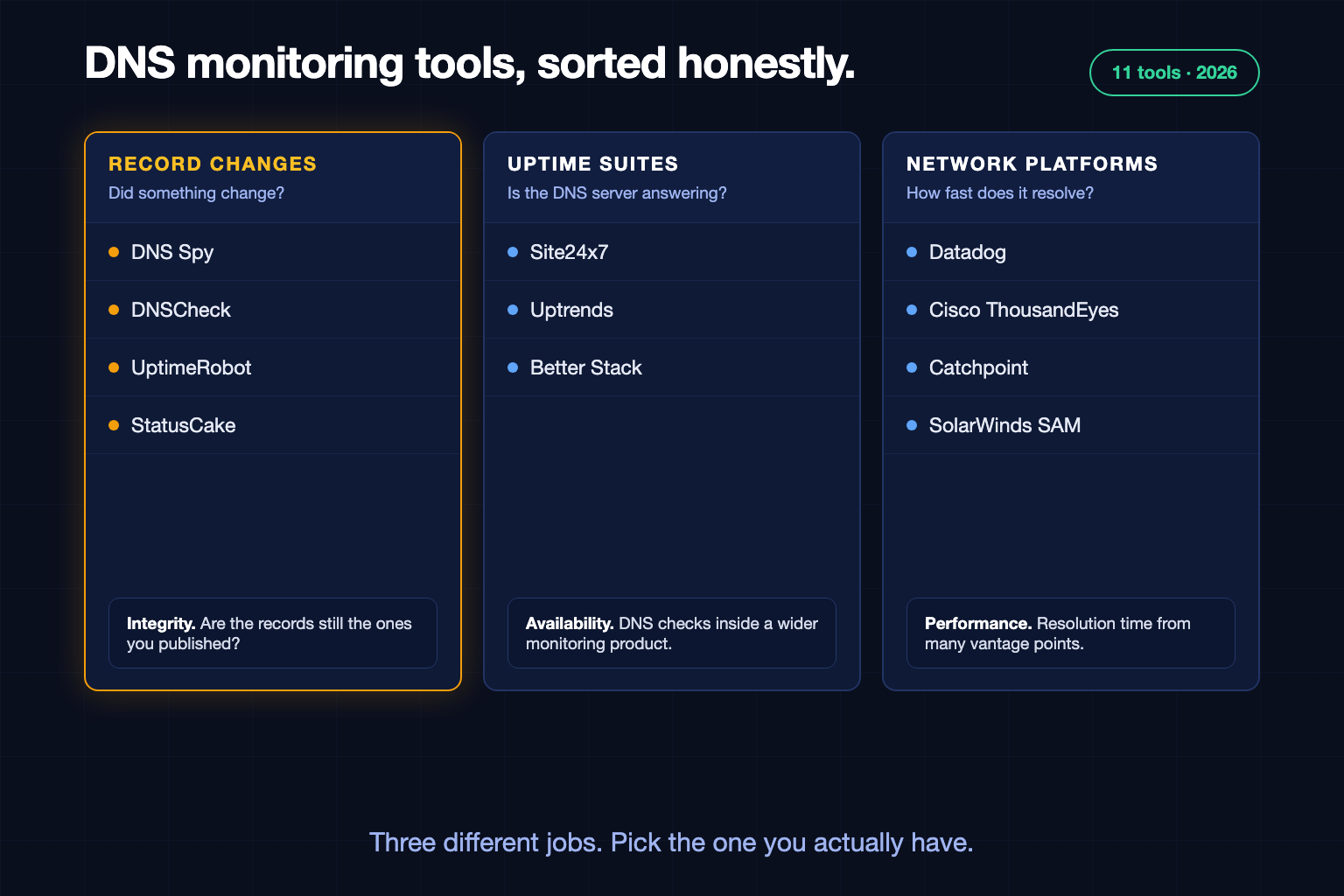
Search for DNS monitoring tools and you get a dozen lists that rank a network performance platform next to a five-dollar uptime checker as if they did the same job. They do not. This comparison sorts the tools by what they actually monitor, using each vendor's own documentation and pricing pages as they stood in November 2026.
A disclosure first: we make DNS Spy, and it is on this list. We have tried to describe every tool, ours included, by what it does and who it suits. Where a vendor's pages did not say something, we say so instead of guessing.
There Are Two Kinds of DNS Monitoring
Nearly every disagreement about the best DNS monitoring tool comes from mixing these up.
Integrity monitoring asks whether your DNS records are still the ones you published. It catches a hijacked A record, an MX record removed during a migration, or a nameserver serving an old zone. The question is: did something change?
Performance monitoring asks how quickly and reliably DNS answers. It measures resolution time from many places and whether each DNS server responds. The question is: is it fast and is it up?
A tool can be excellent at one and absent at the other. If you run your own DNS servers for a large network, you want performance monitoring. If you want to know when a record on your domains changes, you want integrity monitoring. Our guide to DNS monitoring covers the difference in more depth.
What to Look For
Discovery. Does the tool find records, or does it only check the ones you type in? Most verify that a record you name still has the value you expect.
Authoritative checks. Does it ask each authoritative nameserver, or one resolver that may hand back a cached answer?
History. Can you see what a record was last week?
Related signals. Domain expiry, certificates, DNSSEC and look-alike domains fail alongside DNS and are often separate products.
Pricing unit. Per check, per record, per host or per domain. It decides how thorough you can afford to be.
Tools Built Around Record Changes
DNS Spy
DNS Spy builds the record list for you through autodiscovery, zone transfers where allowed, and read-only connections to nine DNS providers, then checks every record against every authoritative nameserver from several regions. Each change is alerted with the old and new value and kept in a per-record history. The same account runs 50 security checks, WHOIS and expiry tracking, and certificate monitoring, with look-alike domain detection and website defacement detection on the Enterprise plan.
Best for: MSPs, security teams and IT teams who need to know when any record on any of their domains changes, without listing records first. It is not a performance monitor: it does not measure resolution latency for capacity planning, and it does not check more often than every few minutes.
Pricing: Priced by domain, not by check. There is no free monitoring plan. There is a free one-time scan and a 7-day trial.
Source: dnsspy.io/pricing
DNSCheck
DNSCheck monitors DNS records and name servers for changes and lookup failures. You import a zone file or select the records to watch, across 14 record types, and it checks every 5 minutes by default. Paid plans add detection of unwanted records and custom name servers. Its pages do not describe DNSSEC, domain expiry, certificate or latency monitoring.
Best for: Small teams who want a focused, low-cost monitor for a known set of records.
Pricing: Free Basic plan for 10 records with 7 days of history. Professional is $8 a month for 100 records. Enterprise starts at $60 a month for 1,000 records.
Source: dnscheck.co/pricing
UptimeRobot
UptimeRobot added DNS monitoring to its uptime product. You pick a record type from 14 supported types, enter the expected value, and it alerts when a monitored record is modified, added or deleted. Domain expiry and SSL expiry are separate monitor types. Its pages do not describe DNSSEC validation or what happens to records you have not listed.
Best for: Teams already using UptimeRobot for uptime who want expected-value checks on a handful of records.
Pricing: There is a free plan and paid plans start with Solo. UptimeRobot's own pages disagree on whether DNS monitoring is included in the free plan, so confirm on its pricing page.
Source: uptimerobot.com/dns-monitoring
StatusCake
StatusCake does not have a dedicated DNS monitor. Its Domain Monitoring tracks expiry and WHOIS and lets you define DNS record rules for a domain.
Best for: Expiry reminders with a few record rules attached, alongside StatusCake uptime checks.
Pricing: The free plan includes one domain monitor checked every 7 days. Paid plans start with Superior.
Uptime and Synthetic Suites With DNS Checks
Site24x7
Site24x7 queries name servers from more than 130 locations, validates the answers against expected values or a pattern, measures response time and validates DNSSEC responses across 12 record types. Checks can run very frequently on higher plans. It is the broadest DNS check among the general monitoring suites, though you still tell it which records to check.
Best for: IT teams who want DNS server checks and response times inside an all-in-one monitoring suite.
Pricing: Free plan available. The Web Uptime plan is $9 a month billed annually.
Uptrends
Uptrends has a dedicated DNS monitor that queries a name server and verifies that the response matches an expected value, with patterns allowed, across the common record types.
Best for: Teams running synthetic monitoring in Uptrends who want DNS assertions in the same place.
Pricing: No free plan; there is a 30-day trial. The Core plan starts from $42 a month.
Source: www.uptrends.com/pricing
Better Stack
Better Stack's DNS monitor checks that a DNS server responds to a query for your domain, as often as every 30 seconds. Its documentation does not describe choosing record types or expected values. Domain expiration and SSL certificate monitors are available separately.
Best for: Teams who want DNS server availability inside an incident management and uptime stack.
Pricing: Free tier with 10 monitors, then priced per block of monitors.
Network Performance Platforms
Datadog
Datadog offers two things. Synthetic DNS tests check resolvability and lookup times against any nameserver, with assertions you write on response time and record values. Cloud Network Monitoring shows DNS traffic inside your own infrastructure: request rates, response times and error codes. Neither watches a zone for unexpected changes.
Best for: Existing Datadog customers adding DNS assertions and internal DNS visibility to their observability.
Pricing: Synthetic API tests are $5 per 10,000 test runs a month billed annually. Cloud Network Monitoring is $5 per host a month billed annually.
Cisco ThousandEyes
ThousandEyes has three DNS test types: DNS Server tests for the performance and availability of specific servers, DNS Trace tests that verify delegation from parent to child, and DNSSEC tests that verify record signatures. Server tests run at intervals from 1 to 60 minutes.
Best for: Enterprise network teams diagnosing DNS and internet path performance.
Pricing: We could not find public pricing.
Source: docs.thousandeyes.com/product-documentation/tests/dns-tests
Catchpoint
Catchpoint, which became part of LogicMonitor in December 2025, measures DNS resolution from many vantage points. Experience tests emulate a recursive resolver with caching disabled, and Direct tests query a name server you specify. DNSSEC checks are available through a custom monitor.
Best for: Large enterprises measuring global DNS performance.
Pricing: We could not find public pricing.
SolarWinds Server & Application Monitor
SolarWinds SAM monitors DNS servers themselves: whether they answer, how quickly, how many requests they handle, and the health of the hardware underneath. It is built for servers you operate, not for watching the records of a zone.
Best for: Organisations running their own DNS servers on premises.
Pricing: No free plan; there is a 30-day trial. SAM starts at $2,900.
Source: www.solarwinds.com/server-application-monitor/use-cases/dns-monitoring
Which One Should You Choose?
You want to know when any record changes, across many domains: a tool built around record changes that discovers records for you. This is what DNS Spy is for.
You have a short, fixed list of records to protect: DNSCheck, or the DNS monitor in the uptime tool you already pay for.
You run your own DNS servers: a server-centric monitor such as SolarWinds SAM or Site24x7.
You need global resolution performance: ThousandEyes, Catchpoint or Datadog.
You mostly worry about domains expiring: expiry monitoring is included in several of these, and it is the cheapest problem on this page to solve.
Many teams end up with two: a performance or uptime tool they already own, and an integrity monitor for the records themselves. They answer different questions, and neither replaces the other.
See What Is on Your Own Domain
The quickest way to judge any of this is to look at your own DNS. The free DNS Spy scan checks a domain's records on every authoritative nameserver, pulls its certificates and runs 50 security checks in about a minute, with no account. If you want it running continuously, the DNS monitoring page explains how it works.
Product names are trademarks of their respective owners. Details were taken from each vendor's public documentation and pricing pages in November 2026 and may have changed. If we have described your product inaccurately, write to support@dnsspy.io and we will correct it.
