Feature · Enterprise · New
Web Watch: Website Defacement Monitoring
DNS tells you where a hostname points. Web Watch visits it every day, takes a screenshot, and uses AI to tell a redesign from a defacement. When a page stops looking like your site, you get an alert with the before and after pictures.
7-day free trial · Full Enterprise access · Not charged until your trial ends
www.example.com
Example alert
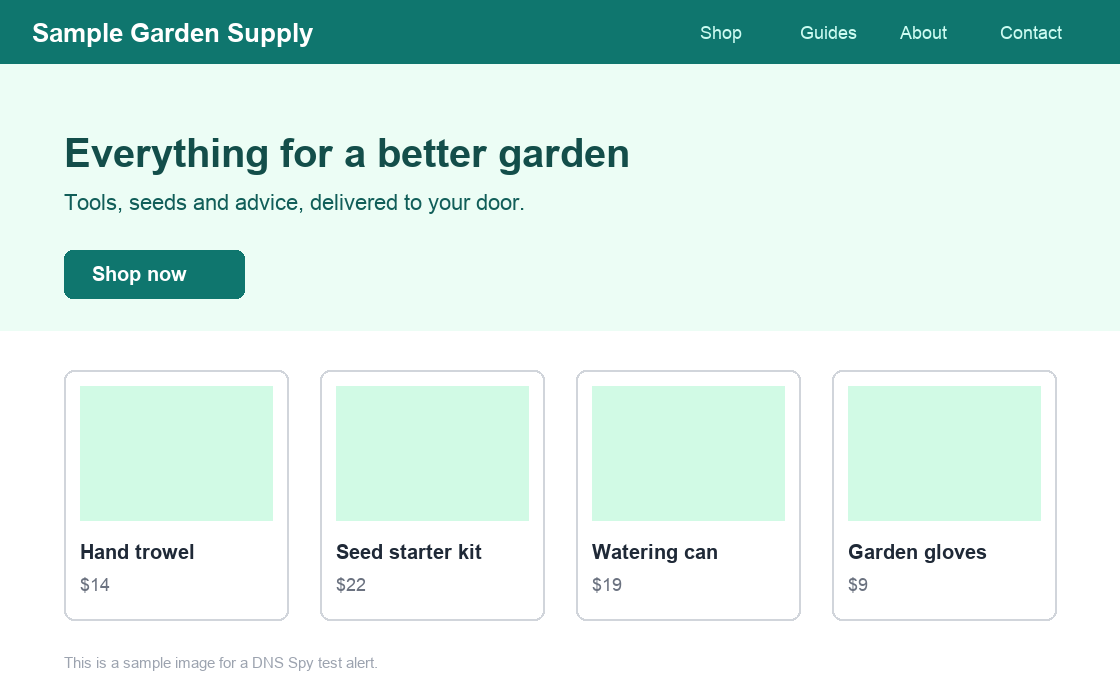
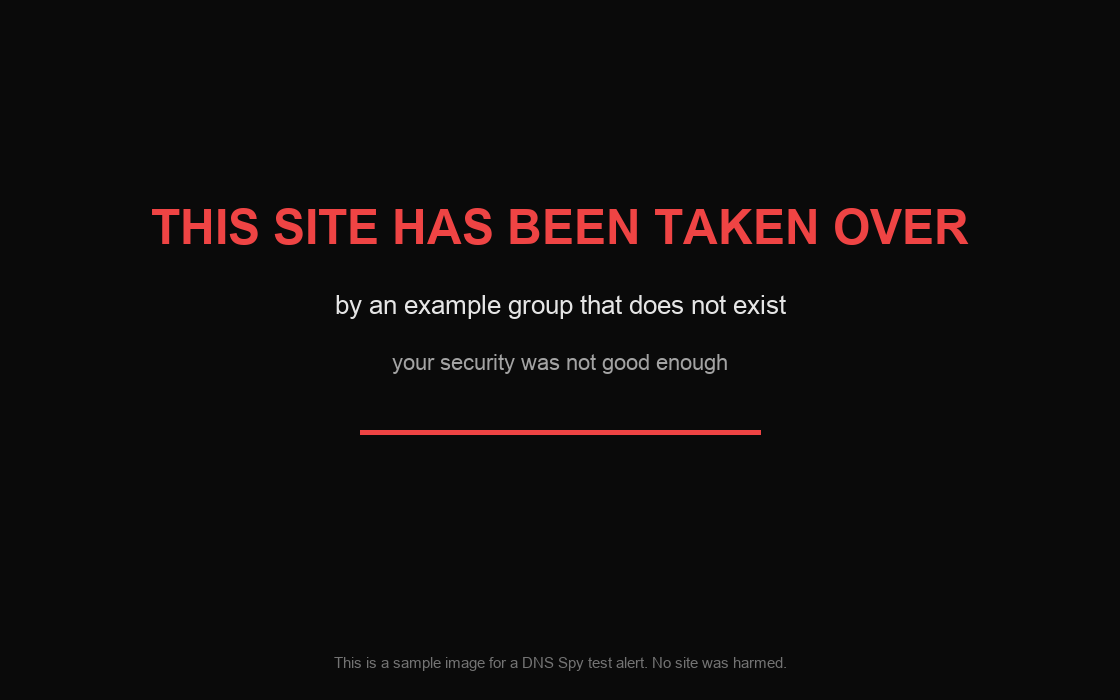
What the model saw: The storefront with its navigation and products has been replaced by a single dark page carrying a message from an unknown group. Nothing of the original site remains.
Nobody Looks at Your Website Every Day
Uptime monitoring tells you a site answers. It does not tell you what it answers with. A defaced page returns a perfectly healthy 200 status, loads quickly, and passes every check you have, while showing your customers someone else's message.
Most defacements are found by a customer, a journalist or a search engine. By then the page has been up for hours or days, and the screenshot doing the rounds is not one you took.
Simple change detection does not solve this either. Real websites change constantly: a new banner, a rotating hero image, today's news. A tool that alerts on every difference is switched off within a week.
What Is Website Defacement Monitoring?
Website defacement monitoring is the regular checking of a website to catch the moment its pages are replaced or vandalised. A defacement is the visible result of something deeper: a compromised web server or CMS, a stolen hosting login, or a DNS record that now points somewhere else.
That last cause is why this belongs next to DNS monitoring. DNS Spy already watches your DNS records for unauthorized changes. Web Watch adds the other half: what is actually being served at the end of those records. A changed A record and a changed homepage on the same day tell one story, and you see both in one place.
Web Watch works alongside SSL certificate monitoring and the Security Center as part of DNS Spy's domain monitoring service. Want to see where your domain stands today? Run a free DNS scan, no signup required.
How Defacement Detection Works
1. Find your websites
Web Watch reads the A, AAAA and CNAME records DNS Spy already monitors and picks the hostnames that serve a website. No list to keep up to date.
2. Screenshot every day
Each site is opened in a real browser once a day. The first good screenshot becomes the baseline that later ones are compared with.
3. Judge the change
When a page changes, an AI model looks at both screenshots and both pages' text and decides: unchanged, a legitimate change, or a suspected defacement.
4. Alert with evidence
A suspected defacement alerts you once, with both screenshots and the model's reason. You hear again when the site looks normal.
What Web Watch Gives You
A daily screenshot of every site
Web Watch opens each of your websites in a real browser once a day and keeps the picture. You see what a visitor sees, not what the server logs say.
Each hostname keeps a baseline screenshot and a history of the last two weeks, so you can scroll back and see when a page changed and what it changed to.
AI that knows a redesign from a defacement
When a page changes, an AI model compares the new screenshot and page text with the baseline and decides whether it is still your site. Marketing updates and redesigns pass quietly.
The model returns a verdict, a confidence level and a plain reason, such as "the storefront has been replaced by a single page carrying a message from an unknown group". You read the reason in the alert.
An alert with the evidence in it
A suspected defacement alerts you once, with the screenshot from before and the screenshot from now, through email, Slack, Discord, PagerDuty, webhook or syslog.
When the site looks normal again you get a second alert saying so. If the flagged page was yours all along, one click makes it the new baseline.
Nothing to install or configure
Hostnames come from the DNS records DNS Spy already monitors for you. Add a domain and its websites are being watched within the hour.
Checks run from the DNS Spy scanner, from outside your network, the same way a visitor or an attacker would reach the site.
Status, redirects and server details
See the status each hostname answers with over HTTPS and HTTP, where it redirects, the page title and the server software it announces.
A hostname that suddenly redirects somewhere new, or starts answering with an error, shows up next to its DNS record history in the same product.
Find forgotten and parked hostnames
Records that point at nothing, at a registrar parking page, or at a site you did not expect are easy to miss in a zone file. Web Watch puts a picture next to each one.
Forgotten hostnames are where subdomain takeovers start. Seeing a parking page or a stranger's site on your own hostname is often the first sign.
Four Web Findings, Checked Daily
Alongside the screenshot, Web Watch reads how each site answers and flags the configuration mistakes that make a defacement easier.
Server version disclosed
The server announces its exact software version, which tells an attacker which known vulnerabilities to try.
HTTP not redirected to HTTPS
The site answers over plain HTTP without sending visitors to the encrypted version.
Default server page
The hostname serves a web server's default welcome page, a sign of a half-finished or abandoned setup.
Open directory listing
The server lists the files in a directory to anyone who asks.
A Scanner That Says Who It Is
Web Watch visits each site about as often as one curious visitor: one check and one screenshot a day. Every request carries a DNSSpy-WebWatch user agent, and the addresses it comes from are published so you can allow them in your firewall or bot protection.
If a site blocks the scanner, Web Watch tells you it was blocked. It does not try to get around the block.
Who Needs Website Defacement Monitoring
MSPs watching client websites
A client's defaced homepage is a phone call you want to make, not receive. Web Watch covers every client domain you already monitor, with no agent on their servers and no per-site setup.
Security teams without a web team
Marketing sites, campaign pages and old microsites sit outside most security tooling. Web Watch gives you a daily look at all of them and a record of what each looked like on any day.
Schools, councils and non-profits
Public-interest sites are common defacement targets and rarely have someone looking at them over a weekend. An alert with a picture reaches whoever is on call.
Shops and SaaS protecting trust
A customer who lands on a vandalised page does not come back to check tomorrow. Knowing within a day, with the evidence attached, is the difference between an incident and a headline.
Know Before Your Customers Do
- A daily screenshot of every website behind your DNS records
- AI Defacement Detection that ignores redesigns and marketing updates
- Alerts with before and after screenshots, and again when the site is back
- Status, redirects and four web findings checked every day
7-day free trial · Full Enterprise access · Not charged until your trial ends
Explore More Features
DNS Record Monitoring
Monitor 47 record types across all authoritative nameservers.
DNS Provider Sync
Import & sync every record from Cloudflare, DNSimple, DigitalOcean & more.
Security Center
40+ automated security checks with weighted scoring.
Phishing Sentinel
Look-alike domain detection and brand protection.
WHOIS Monitoring
Track WHOIS changes and domain expiration dates.
SSL Monitoring
Certificate discovery, expiration tracking, and TLS auditing.
Domain Groups
Organize domains by client, environment, or business unit.
Notifications
Email, Slack, Discord & PagerDuty alert channels.
MCP Server
Connect Claude & AI agents to your DNS monitoring.
Frequently Asked Questions
Website defacement monitoring is the regular checking of a website to catch the moment its pages are replaced or vandalised by someone who should not have access. A defacement is usually the visible result of a compromised web server, CMS, hosting account or DNS record. Monitoring means a service looks at the page for you every day and tells you when it stops looking like your site.
Web Watch takes a screenshot of each website once a day and keeps a baseline of what the page normally looks like. When a new screenshot differs enough from the baseline, both screenshots and the text of both pages are shown to an AI model, which answers one question: does this still look like the same legitimate site? If the answer is no, you get an alert with both screenshots and the reason.
No. That is the point of using a model instead of a pixel comparison. A new banner, a redesign, a rotating hero image, a cookie notice or an updated news list is judged a legitimate change, and the new page quietly becomes the baseline.
The alert always says "suspected" and always includes both screenshots, so you can judge in seconds. If the flagged page is really yours, choose "Not a defacement" in Web Watch. That page becomes the baseline and you are not alerted about it again.
Web Watch picks hostnames from the A, AAAA and CNAME records DNS Spy already monitors for your domain, starting with the root and www and then common names such as app, portal, login and shop. You can pause any hostname. There is nothing to install and no list to maintain.
Each day Web Watch records the status each hostname answers with over HTTPS and HTTP, the full redirect chain, the page title and the server software it announces. It flags four things: a server that discloses its version, HTTP that does not redirect to HTTPS, a default web server page, and an open directory listing.
Yes. When a later screenshot shows your normal page again, DNS Spy closes the suspicion and sends a second alert saying the site looks normal, with the current screenshot.
Requests come from the DNS Spy scanner, from outside your network, and identify themselves with a DNSSpy-WebWatch user agent. The source addresses are published at dnsspy.io/web-watch-scanner so you can allow them in your firewall or bot protection. If a site blocks the scanner, Web Watch reports that it was blocked and does not try to get around it.
Screenshots are of the public page a visitor would see without logging in. They are stored privately for your team, kept for 30 days, and a flagged screenshot is kept longer so you have a record of the incident. A screenshot is shown to the AI model only when the page has changed, and only to produce the verdict.
Web Watch, including Defacement Detection and its alerts, is part of the Enterprise plan. It is included in the 7-day free Enterprise trial, and it starts on your domains within the hour of adding them.
What Is Your Homepage Showing Right Now?
Start a free Enterprise trial, add your domain, and your first screenshots arrive the same day.
Start Free Trial